

Part 4 of the ARIA series. In Part 3 we built an MCP server inside ARIA and clicked through it in MCP Inspector on a laptop. This time ARIA moves to Azure, Azure API Management turns one of its REST endpoints into an MCP tool without the app knowing, a key goes in front of it, and Claude Code CLI calls the tool from a real session.
In the first three posts (part 3) I built ARIA, a small Blazor app that lists Azure subscriptions and resources, almost entirely with Claude Code, then gave it an MCP server with three tools, one resource and one prompt. All of it ran on my laptop with my own az login. That is fine for testing and useless for anybody else.
This post is about what it takes to make it useful for somebody else, and about the question Part 3 quietly skipped: how does a remote client prove it is allowed to call the server at all? We do the simple answer here, an API key. The real answer, OAuth 2.1 with Microsoft Entra ID, is Part 5.

Two ways a gateway can speak MCP
Azure API Management, APIM from here on, is a managed gateway. You put it in front of your APIs, it gives them one public address, and it lets you add rules without changing the backend: require a key, limit the rate, check a token. The backend does not know the gateway exists.
APIM can expose MCP in two ways, and you should know which one you are looking at.
Way 1 turns an existing REST API into an MCP server. APIM reads the API’s operations and offers each one as a tool. The tool’s name and description come from the API definition in the portal, not from any code, and the backend never learns that MCP is involved. The limit: tools only, no resources, no prompts. It is the right fit for the huge number of REST APIs that already exist. This is the way we use in this post.
Way 2 puts APIM in front of an MCP server that already exists, as a passthrough. Tools and resources go through, prompts do not. That is how ARIA’s real /mcp server from Part 3 will go behind the gateway, and it opens Part 5.
One thing to know before you pick a tier: the Consumption tier, the one everybody reaches for in a demo, does not support MCP servers. Developer is the cheapest that does, about 48 USD a month at list price. The App Service plan underneath, B1 Linux, is about 13 USD. Together roughly two dollars a day while the setup stays up.
The rules had to change first
ARIA has a Spec Kit constitution, and two of its rules were in the way. It said the app authenticates with the logged-in az login identity, and in App Service there is no az login. And it said the MCP server is the only machine-facing interface, no REST without an amendment, while Way 1 needs one REST endpoint to demonstrate.
So, as in Part 3, the first move was to change the rules on purpose:
/speckit-constitution Change Principle II so that ARIA authenticates to Azure with DefaultAzureCredential: the logged-in az login identity when running locally, and the app's system-assigned managed identity when running in Azure. Still no secrets in code or configuration. Change Principle I to also allow a minimal read-only HTTP API alongside the MCP server, exposing only data the MCP tools already expose. Keep everything read-only. Bump the version.
Then the lean Spec Kit path from Part 3: specify, plan, tasks, implement.
/speckit-specify Make ARIA ready to run in Azure. It must authenticate to Azure with the identity of where it runs: the signed-in az login user on a developer machine, and the app's own managed identity when deployed. Add one read-only HTTP endpoint that returns the list of subscriptions the identity can access, the same data the list_subscriptions MCP tool returns. No other behaviour changes.
/speckit-plan Replace AzureCliCredential with DefaultAzureCredential in all Azure services, created once and registered in DI so services share it. Add a Minimal API endpoint GET /api/subscriptions in Program.cs that calls IAzureSubscriptionService.ListSubscriptionsAsync and returns JSON. Add xUnit, NSubstitute and Shouldly tests for the endpoint. Do not change the MCP surface.
What came out was small: one DefaultAzureCredential registered once and shared by the three Azure services, one GET /api/subscriptions endpoint that returns the same list as the list_subscriptions tool, and fourteen new tests. The MCP server did not change at all.
One class, two identities
DefaultAzureCredential is the reason the same compiled app runs on the laptop and in the cloud without a single if. It tries a chain of places where an identity might be found: environment variables, a managed identity, Visual Studio, the Azure CLI, and so on, and uses the first that works. On the laptop that is az login. In App Service it is the app’s own managed identity, an identity Azure creates for the app, with no password and no secret, that lives and dies with it.
That is also where the first surprise came from. After the change, the endpoint and the MCP tool returned the same list of subscriptions, so the “same data” check passed. But the list had ten subscriptions from a tenant I was not expecting, where az account list showed four in mine. No error anywhere. Claude noticed the mismatch, asked the credential for a token and printed only the tenant and the app id from it, and the answer was clear: the token came from Visual Studio’s sign-in, another work account, because VisualStudioCredential sits before AzureCliCredential in the chain. Same code, wrong identity, wrong data, no error. Compare with az account show and you catch it. Trust the output alone and you do not.
The fix touched no code: one environment variable, AZURE_TOKEN_CREDENTIALS=AzureCliCredential, in the local launch profiles only. That file never reaches App Service, so in the cloud the chain still finds the managed identity.
Deploying was a resource group, one az webapp up into a B1 Linux plan, az webapp identity assign for the identity, and one Reader role on the subscription. Reader is enough for everything ARIA does, including the Function App details. Then Connect in the cloud, and one subscription appears. Locally the same page shows four. Same code, different identity, different answer. That is the sentence to remember.

Side note: one page did not work in the cloud, the Function App Details page from Part 2, because the App Service front end decodes %2F in the URL before the request reaches the app. Claude moved the id to a query string and a redeploy fixed it. A bug no local test could have found; the guide has the diagnosis.
From a REST operation to an MCP tool, in the portal
The APIM part is portal work, and the guide has every click. The shape of it: define an HTTP API pointing at the App Service, add one operation, GET api/subscriptions, with a good description, then MCP Servers > Create MCP server > Expose an API as an MCP server, pick the operation, name it aria-mcp-http. APIM gives you an MCP server URL ending in /aria-mcp-http/mcp and a Tools blade with one tool in it.

Fill in that operation description. It is not politeness. APIM turns the operation into the tool and the description becomes the tool description, which is exactly what an AI model reads to decide whether to call it. Part 3 said the same about the [Description] attributes in C#. Here the description lives in the gateway, and ARIA does not know the tool exists.
One naming trap: in APIM a “subscription” is a named pair of keys with a scope, sent in the Ocp-Apim-Subscription-Key header. It has nothing to do with an Azure subscription, which is confusing for an app whose whole job is to list Azure subscriptions.
Where the gateway actually checks the key
I opened MCP Inspector, added the APIM URL as a Streamable HTTP server, and connected without any key. It connected. The Tools tab listed the subscriptions tool. Only when I called it did I get a 401, and I got it as the tool’s result:
{
"statusCode": 401,
"message": "Access denied due to missing subscription key. Make sure to include subscription key when making requests to an API."
}

Here is what happened. The key check in APIM is not a policy, it is a Subscription required switch, and it exists in two places: on the API and on the MCP server made from it. The API had it on. The MCP server was created with it off. So anybody could connect and read the tool list without a key, and the check only fired one layer down, when APIM forwarded the call to the REST API. Worse, the 401 came back as a tool result, so an AI client would have read it as “the tool failed”, not as “you need to authenticate”.
The fix is one checkbox in the MCP server’s Settings. After it, connecting without a key fails at the very first request, and the gateway answers with a WWW-Authenticate header that names the header it wants. That is the behaviour you want, and it is the same mechanism Part 5 will use with a proper Bearer challenge.
The key itself needs a scope that covers both the API and the MCP server, and in APIM the way to say “these belong together, one key opens all of them” is a product. Product ARIA, both in it, one key scoped to the product. With that key in Inspector’s custom headers, the card goes green, and the Network pane shows the Streamable HTTP handshake from the Part 3 appendix running live against a real gateway.

Run the tool and one subscription comes back, the same one the cloud UI showed, because it is the same managed identity at the end of the chain: Inspector, gateway, REST API, App Service, managed identity, Azure.
Claude Code as the client
This is the payoff promised in Part 3. From a scratch folder, not the repository:
claude mcp add --transport http aria https://<apim-name>.azure-api.net/aria-mcp-http/mcp --header "Ocp-Apim-Subscription-Key: <key>"
The default scope is local: the server goes into .claude.json in your user profile, filed under this folder’s path, so it loads only when you start Claude Code here and it is private to you. Do not use –scope project for this; that writes a file into the repository with the key in it. And notice that even at local scope the key is printed in the terminal and stored in plain text. One more argument for Part 5.
In a session, /mcp shows aria connected with one tool. Then:
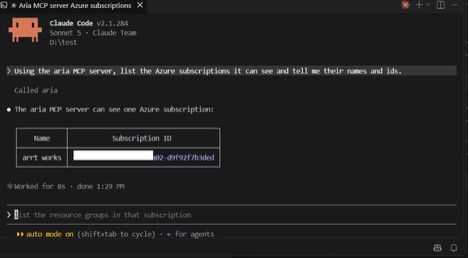
Using the aria MCP server, list the Azure subscriptions it can see and tell me their names and ids.
Claude calls the tool once and answers with a small table, in about eight seconds. Same answer as Inspector, same answer as the cloud UI.
Then I asked for something the tool cannot do:
list the resource groups in that subscription
No tool call. Claude answered that the aria MCP server only exposes a single tool, subscriptions, and it cannot fetch resource groups through it.

That is the “tools are model-controlled” point from Part 3 seen from the other side: the model read the tool list, found nothing that fits, and said so instead of inventing an answer. It is also the honest limit of Way 1 in one picture. list_resources and get_function_app_details exist in ARIA, but they live on the real MCP server, and that one goes behind the gateway in Part 5.
What the key is, and is not
A word before the wrap-up, because it is easy to leave this post thinking the setup is secure. The key protects the gateway. It tells APIM that a key was used, not who used it; checking identity is a policy job, and that is Part 5. And the App Service behind the gateway is still public: anybody with the azurewebsites.net address can call /api/subscriptions or /mcp directly and skip the key. I left it like that on purpose, to keep the moving parts down to the ones this post is about. In a real deployment the app must not be reachable except through the gateway, with a virtual network or an IP restriction to the gateway’s address. We close that door in Part 5.
Wrapping up
ARIA now runs in Azure with a managed identity instead of my login. One REST endpoint sits behind API Management as an MCP tool, protected by a product key, and Claude Code calls it from a real session.
Four things worth taking with you:
- DefaultAzureCredential is why one binary runs everywhere, and also why you must check which identity it picked, because it will not tell you when it is the wrong one.
- APIM’s REST-to-MCP mode gives you tools only, named and described from the API definition. The description you type in the portal is what the model reads.
- The key check is a switch in two places, on the API and on the MCP server, and a key’s scope has to cover the door you knock on. Products are how one key opens several doors.
- A key is a lock, not an identity. The app behind the gateway being reachable was a choice to keep this post simple, not how it should stay.
In the next post the gateway goes in front of ARIA’s real MCP server from Part 3, tools, resource, and the prompt that will not make it through. Then the key is replaced with OAuth 2.1 and Microsoft Entra ID, we walk through the parts that do not work the first time, and Claude Code logs in through the browser and calls the tools as a named user.


follow us